Streamlining Consent: A Practical Guide to the Cookies Popup Adobe XD Template
In the modern digital landscape, user experience and legal compliance often feel like opposing forces. Designers and developers are constantly tasked with integrating necessary legal frameworks—like GDPR or CCPA consent forms—without disrupting the visual flow of a website. This is where a pre-built Cookies Popup - Adobe XD template becomes an invaluable asset. Rather than starting from scratch every time a new project begins, utilizing a well-organized, layer-based design file allows creative professionals to maintain high standards while significantly reducing production time.
The core value of this resource lies not just in its aesthetic appeal, but in its structural integrity. When we talk about a template that is "well organized all in layers with clear names," we are addressing one of the most persistent pain points in UI/UX design: handoff friction. A messy file leads to miscommunication between designers and developers, resulting in implementation errors and wasted hours. By contrast, a template designed with clarity ensures that every element, from the background overlay to the call-to-action button, is easily identifiable and modifiable.
Real-World Applications Across Industries
The utility of a ready-to-use cookies popup extends far beyond simple regulatory box-ticking. Different industries face unique challenges when implementing consent mechanisms, and a flexible Adobe XD format allows for tailored solutions that respect brand identity while meeting legal requirements.
E-Commerce and Retail
For online retailers, the checkout journey is sacred ground. Any interruption can lead to cart abandonment. However, cookie consent is mandatory. Using a high-quality 72 dpi template allows e-commerce designers to create non-intrusive popups that align seamlessly with the store’s branding. Because the file is fully editable, you can adjust the typography and colors to match seasonal campaigns. For instance, during a Black Friday sale, the popup’s accent colors can be quickly shifted to match the promotional theme, ensuring the consent request feels like part of the shopping experience rather than a bureaucratic hurdle.
SaaS and Tech Startups
Software-as-a-Service platforms often rely on complex user dashboards. Clutter is the enemy here. A clean, minimalistic cookies popup designed in Adobe XD can be stripped down to its essential elements. Since the template allows you to move or remove elements with ease, product designers can disable unnecessary graphics or simplify the text to maintain the sleek, functional aesthetic typical of tech products. The ability to edit texts and fonts quickly means that legal teams can update privacy language without requiring a complete redesign from the creative team.
Publishing and Media Houses
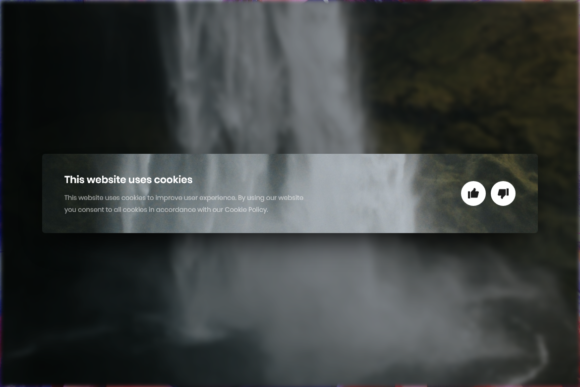
News outlets and blogs depend heavily on ad revenue and analytics, which require robust cookie tracking. However, aggressive popups can drive readers away. A well-structured Adobe XD template enables media designers to experiment with placement and opacity. You might choose a semi-transparent background that allows the article content to remain visible, reducing the feeling of obstruction. The layer organization makes it simple to toggle between different states—such as "expanded settings" versus "minimal accept"—allowing for rapid A/B testing of different UI approaches to see which yields higher compliance rates with lower bounce rates.
The Importance of Organization and Editability
When evaluating design resources, the phrase "easy to use" is often thrown around loosely. In the context of a Cookies Popup - Adobe XD file, this translates to specific technical advantages that impact your workflow directly.
First, consider the layer structure. A professional template will group elements logically. The background mask, the container box, the iconography, the headline, the body text, and the action buttons will each reside in their own clearly named groups. This organization is crucial when you need to make global changes. If a client decides they want rounded corners instead of sharp edges, you can adjust the corner radius of the main container without accidentally distorting the text or buttons inside it. Without clear naming conventions, finding the right layer can feel like searching for a needle in a haystack, especially in complex files.
Second, the editability of texts, fonts, and colors is paramount for brand consistency. Most businesses have strict style guides. A rigid template that requires you to dig into vector paths to change a color code is inefficient. A high-quality Adobe XD file utilizes shared styles and components. This means that if you change the primary brand color in one place, it updates across the entire popup. This feature alone saves hours of manual adjustment and prevents human error, ensuring that the final product looks polished and professional.
Technical Considerations and Quality Standards
While Adobe XD is a vector-based tool, the output resolution matters when exporting assets for development. The specification of "High quality 72 dpi" is standard for web graphics. It ensures that images and icons appear crisp on standard screens without creating unnecessarily large file sizes that could slow down page load times. For designers, working at 72 dpi in XD provides a true-to-life preview of how the element will appear in a browser environment.
However, it is important to understand the limitations. Adobe XD is a design and prototyping tool, not a development environment. The template provides the visual blueprint, but it does not generate the JavaScript or CSS code required to make the popup functional on a live website. Developers will still need to translate the design into code. This is where the "ready to use" aspect of the design file pays off. Because the spacing, padding, and font sizes are precisely defined in the XD file, developers can inspect the design and extract exact values, reducing the guesswork and back-and-forth communication typically associated with frontend implementation.
Navigating Common Challenges
Before integrating a pre-made popup into your project, there are several practical considerations to keep in mind.
- Legal Compliance vs. Design Freedom: While the template offers aesthetic flexibility, the content must remain compliant with local laws. Ensure that the text placeholders are replaced with legally vetted copy. The design should facilitate clear choices, such as distinct "Accept" and "Decline" buttons, rather than hiding options behind confusing interfaces.
- Mobile Responsiveness: Although the Adobe XD file may show a desktop view, consider how the elements will stack on mobile devices. A well-organized layer structure makes it easier to duplicate the artboard and rearrange elements for a mobile-first approach. Check if the template includes mobile variants; if not, use the editable nature of the file to create them efficiently.
- Brand Alignment: Avoid the temptation to use the template "as is." Even small tweaks to the font weight or button shadow can make the difference between a generic look and a bespoke brand experience. Use the easy-to-edit features to infuse your brand’s personality into the component.
Maximizing Value for Creative Teams
For agencies and freelance designers, time is money. A Cookies Popup - Adobe XD template acts as a force multiplier. It eliminates the repetitive task of drawing rectangles, choosing font sizes, and aligning buttons for every single client project. Instead, you start with a solid foundation that adheres to UI best practices. This allows you to focus your energy on higher-value tasks, such as user research, complex interaction design, or strategic branding.
Moreover, having a standardized, high-quality base file ensures consistency across your portfolio. When every project starts with a professionally structured component, the overall quality of your deliverables rises. Clients appreciate the attention to detail, and developers appreciate the clarity of the handoff. In an industry where margins can be tight and deadlines tight, leveraging tools that are both powerful and straightforward is not just a convenience—it is a strategic necessity.
Ultimately, the goal is to create digital experiences that are respectful of the user’s privacy and enjoyable to navigate. By using a resource that prioritizes organization, editability, and quality, you bridge the gap between legal necessity and design excellence. Whether you are building a simple landing page or a complex web application, starting with a robust Adobe XD template sets the stage for a smoother, more efficient design process.