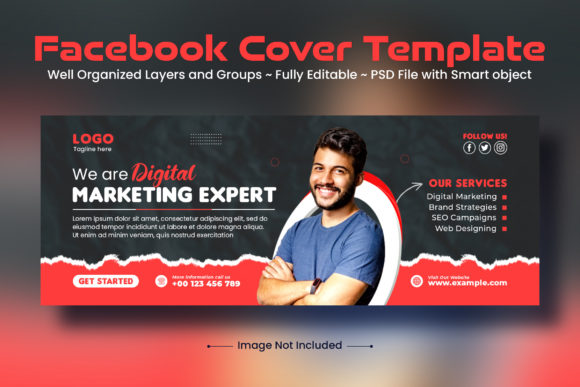
Corporate Facebook Cover Template Design: A Practical Guide for Professional Branding
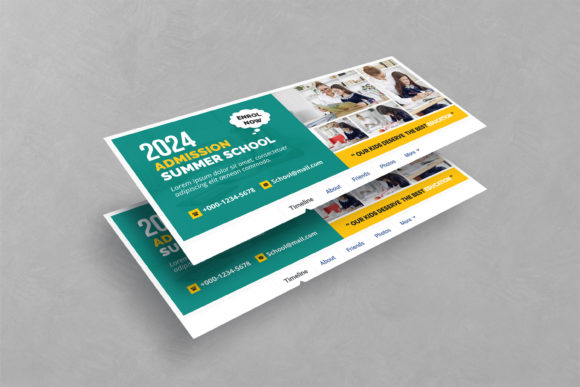
In the digital age, your social media presence often serves as the first handshake with potential clients, partners, and customers. Among the various visual touchpoints, the Facebook cover photo holds prime real estate. It is the largest image on your profile, yet it is frequently overlooked or treated as an afterthought. This is where a Corporate Facebook Cover Template Design becomes an invaluable asset. Rather than staring at a blank canvas in Photoshop, wondering how to balance branding elements with whitespace, you can leverage a pre-structured layout that guarantees a polished, professional appearance.
This article explores why these templates are essential tools for modern businesses and how different users—from solo freelancers to established corporations—can utilize them to enhance their brand identity effectively.
Why Visual Consistency Matters on Social Media
Before diving into the technical aspects of editing a PSD file, it is crucial to understand the "why." Human beings are visual creatures. When a user lands on your corporate Facebook page, they form an impression within seconds. A cluttered, pixelated, or misaligned cover photo suggests a lack of attention to detail. Conversely, a clean, modern design communicates reliability and professionalism.
A Corporate Facebook Cover Template Design ensures that your visual identity remains consistent across platforms. Whether you are a marketing agency, a legal firm, or a tech startup, consistency builds trust. By using a template, you eliminate the guesswork involved in design principles such as alignment, hierarchy, and color theory. The heavy lifting has already been done by a professional designer, allowing you to focus on the content rather than the composition.
Who Benefits from Using Corporate Cover Templates?
The utility of these templates extends far beyond large enterprises with dedicated design teams. In fact, they are often most beneficial for those with limited resources but high standards for quality.
Small Business Owners and Entrepreneurs
For a small business owner, time is a scarce commodity. You might be excellent at your craft—whether it’s baking artisanal bread or providing financial consulting—but graphic design may not be your strong suit. Hiring a designer for every seasonal update or promotional campaign can quickly become prohibitively expensive. A fully editable PSD template offers a cost-effective solution. With just the basics of Photoshop, you can swap out text and images to reflect current promotions, holiday hours, or new service offerings.
Freelancers and Personal Brands
Freelancers often wear many hats, including that of the art director. A clean, eye-catchy template helps elevate a personal brand to look more established. For instance, a freelance writer can use the template to highlight their niche expertise, while a photographer can showcase their best work within the designated image placeholders. The key here is adaptability; the template provides a structure that makes individual creativity shine without looking amateurish.
Marketing Teams and Agencies
Even for professionals, speed is essential. Marketing teams often need to roll out campaigns across multiple client accounts simultaneously. Using a standardized Corporate Facebook Cover Template Design allows for rapid deployment. Since the files are well-organized and layered, swapping out logos and taglines takes minutes rather than hours. This efficiency enables teams to maintain a high volume of output without sacrificing quality.
Real-World Use Cases and Scenarios
Understanding the features of a template is one thing; knowing when to apply them is another. Here are several realistic scenarios where these templates prove their worth.
- Product Launches: When introducing a new product, you need to grab attention immediately. A template with bold typography and clear image zones allows you to feature the product prominently while keeping your company logo visible. The RGB color mode ensures that the vibrant colors of your product pop on screens.
- Event Promotion: Hosting a webinar, conference, or local workshop? Templates make it easy to update dates, times, and registration links. Because the design is clean and modern, the essential information stands out, reducing cognitive load for the viewer.
- Seasonal Campaigns: During holidays or special sales events, brands often update their visuals. Instead of redesigning from scratch, you can keep the core layout and simply change the background imagery or accent colors to match the season. This maintains brand recognition while adding timely relevance.
- Rebranding Efforts: If your company is undergoing a subtle refresh, a template allows you to test new fonts or color palettes in a low-risk environment. You can see how the new elements interact with your existing layout before committing to a full-scale redesign.
Key Features to Look For in a Template
Not all templates are created equal. When selecting a Corporate Facebook Cover Template Design, consider the following features that contribute to ease of use and final quality.
Full Editability: The best templates are fully layered. This means every element, from text boxes to shapes, can be moved, resized, or deleted. Avoid flattened images that restrict your creative freedom.
Organized Layer Structure: A well-organized PSD file saves time. Look for templates where layers are grouped logically (e.g., "Text," "Background," "Logo"). This makes navigation intuitive, even for beginners.
Free Fonts: One common frustration with design assets is discovering that they require expensive, licensed fonts. High-quality templates use free fonts, with download links provided in the help file. This ensures that what you see in the preview is exactly what you can recreate without additional costs.
RGB Color Mode: Since Facebook is a digital platform, ensure the template is set to RGB color mode. This guarantees that colors appear accurately on monitors and mobile devices, avoiding the dullness that can occur when converting from CMYK (print) modes.
Practical Considerations Before You Start Editing
While these templates are designed to be user-friendly, a few practical steps can ensure a smooth experience.
First, familiarize yourself with the basics of Photoshop. You do not need to be an expert, but understanding how to select layers, change text, and export files is essential. Most templates come with a help file; read it. It often contains specific instructions on how to replace smart objects or adjust layer styles.
Second, remember that photos are typically not included in the main download. They are for preview purposes only. You will need to source your own high-resolution images. Ensure that any images you use align with the tone of the design. A corporate template might look disjointed if paired with casual, low-quality stock photos.
Third, consider the safe zones. Facebook crops cover photos differently on desktop and mobile devices. A good template accounts for this, but always double-check your final export. Place critical text and logos in the center-safe area to ensure they are never cut off on smaller screens.
Making the Most of Your Investment
Purchasing or downloading a Corporate Facebook Cover Template Design is an investment in your brand’s perception. To maximize its value, treat it as a living asset. Update it regularly to reflect current business goals. Engage with your audience by using the cover space to highlight what matters most at any given moment.
If you encounter difficulties, most designers offer support. Do not hesitate to reach out via their profile if you need clarification on customization. Additionally, leaving a rating or review helps the creator improve their products and assists other users in making informed decisions.
In conclusion, a professional cover template is more than just a pretty picture. It is a strategic tool that enhances credibility, saves time, and simplifies the design process. By choosing a clean, modern, and fully editable template, you empower your business to present its best face to the world, effortlessly and effectively.