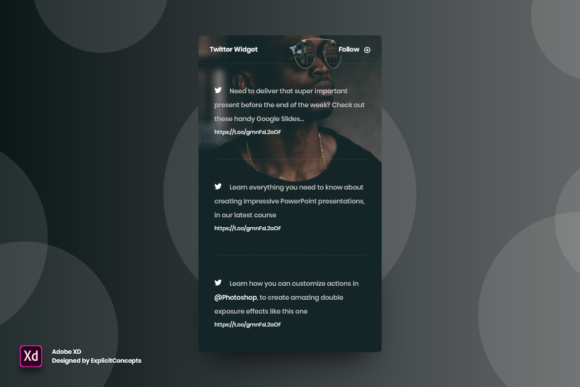
Streamlining Social Media Integration with the Twitter Widget for Adobe XD
In the fast-paced world of digital design, efficiency is not just a luxury; it is a necessity. Designers, developers, and content creators are constantly seeking tools that bridge the gap between static mockups and dynamic, real-world applications. One such tool that has gained significant traction among UI/UX professionals is the Twitter Widget for Adobe XD. This resource is more than just a pre-made graphic; it is a comprehensive, fully editable template designed to simplify the process of integrating social media feeds into web and mobile interface designs.
For those unfamiliar with the specific utility of this asset, it serves as a foundational block for designers who need to visualize how live Twitter (now X) content will appear within their layouts. By providing a well-organized structure with clear layer names, this widget eliminates the tedious hours often spent reconstructing social media components from scratch. Instead, it offers a ready-to-use solution that maintains high visual fidelity while allowing for complete creative control.
The Architecture of Efficiency: Organization and Editability
The primary value proposition of any design template lies in its usability. A beautiful design that is difficult to modify is ultimately counterproductive. The Twitter Widget - Adobe XD addresses this challenge head-on by prioritizing organization. Every element within the file is meticulously arranged in layers with clear, descriptive names. This level of organization is crucial for professional workflows where multiple stakeholders may need to review or edit the design.
When a designer opens the file, they are not greeted with a chaotic mess of unnamed groups and hidden objects. Instead, they find a logical hierarchy. This structure makes the widget fully editable and really easy to use. Whether you need to adjust the width of the feed, change the background color to match a brand palette, or swap out placeholder tweets for realistic content, the process is intuitive. The ability to move or remove elements without breaking the overall layout ensures that the design remains robust throughout the iteration process.
Furthermore, the widget is designed with flexibility in mind. Users can easily edit texts, fonts, and colors. This adaptability is essential because no two projects are identical. A corporate finance app will require a different aesthetic than a casual lifestyle blog. With this Adobe XD asset, the core structure remains intact while the visual styling can be customized to fit any brand identity seamlessly.
Technical Specifications and Quality Standards
Beyond organizational logic, the technical quality of the asset plays a pivotal role in its effectiveness. The widget is delivered in the native Adobe XD format, ensuring compatibility with one of the industry’s leading prototyping tools. It is rendered at a high quality 72 dpi, which is the standard resolution for web and screen-based design. This ensures that the graphics appear crisp and clear on various devices without unnecessarily inflating file sizes, which can slow down project performance.
The choice of 72 dpi is deliberate. It strikes a balance between visual clarity and performance optimization. For web designers, this means the assets can be exported directly for development handoff without requiring additional resizing or resolution adjustments. The ready-to-use nature of the file means that from the moment of download, the designer can begin integrating the widget into their broader project ecosystem.
Real-World Applications and Use Cases
Understanding the features of the Twitter Widget - Adobe XD is important, but knowing where to apply it is even more critical. This tool is versatile and can be beneficial across a wide range of digital products. Below are several scenarios where this widget proves invaluable:
- News and Media Platforms: News websites often embed live Twitter feeds to provide real-time updates and social proof. Designers can use this widget to mock up how these feeds will look alongside article content, ensuring readability and visual harmony.
- E-commerce Stores: Many online retailers integrate social media feeds to showcase user-generated content or brand announcements. This widget allows designers to visualize how product tags and social interactions might appear on a homepage or product page.
- Corporate Portfolios: Businesses often display their latest tweets to highlight company culture, press mentions, or industry thought leadership. The editable nature of the widget allows brands to customize the look to align strictly with their corporate guidelines.
- Event Landing Pages: For conferences or webinars, displaying a live hashtag feed is common. Designers can use this template to plan the layout of these dynamic sections, ensuring they do not overwhelm the primary call-to-action elements.
In each of these cases, the goal is not just to place a box on the screen, but to create a cohesive user experience. The Twitter Widget - Adobe XD facilitates this by providing a realistic representation of social media content, allowing designers to test spacing, typography, and color contrast effectively.
Evaluating Suitability for Your Project
While the benefits are clear, it is important to evaluate whether this specific tool fits your current needs. Not every project requires a dedicated Twitter widget template. Here are some factors to consider when deciding if this asset is right for you:
- Project Timeline: If you are working under tight deadlines, the time saved by using a pre-built, well-organized template can be significant. However, if you have ample time and wish to create a completely unique social component from scratch, you might prefer building your own.
- Design Consistency: If your project involves multiple pages or screens that require social media integration, using a standardized widget ensures consistency. The fully editable nature of the file allows you to create variants while maintaining a unified structural logic.
- Technical Proficiency: This tool is designed to be easy to use, making it suitable for both junior designers and seasoned veterans. However, users should have a basic understanding of Adobe XD’s layer management and component features to maximize its potential.
It is also worth noting that while the widget is high quality and ready to use, it is a static representation. It does not contain live code or functional API connections. Its purpose is strictly for design and prototyping within the Adobe XD environment. Developers will still need to implement the actual functionality using Twitter’s API or third-party embedding tools during the development phase.
Navigating Limitations and Expectations
No tool is without its limitations, and having realistic expectations is key to a successful design process. The Twitter Widget - Adobe XD is a design asset, not a development framework. Therefore, it will not automatically update with live tweets. Designers must manually update the placeholder text and images to reflect the type of content they expect to see.
Additionally, while the file is easy to edit texts, fonts, colors, move or remove elements, complex structural changes may require a deeper understanding of Adobe XD’s constraints and stacks. For instance, if you decide to completely overhaul the layout from a vertical list to a horizontal carousel, you may need to rebuild certain auto-animate interactions. However, for standard feed implementations, the provided structure is more than sufficient.
Another consideration is platform evolution. As Twitter transitions to X and updates its interface, the visual style of the widget may need occasional adjustments to remain current. The fully editable nature of the file makes these updates straightforward, but designers should stay informed about platform changes to ensure their mockups remain accurate.
Conclusion: Enhancing Workflow with Smart Design Assets
In conclusion, the Twitter Widget for Adobe XD represents a smart investment in design efficiency. By offering a well-organized, high-quality, and ready-to-use template, it allows creators to focus on the broader aspects of user experience rather than getting bogged down in the minutiae of recreating common UI elements. Its fully editable structure ensures that it can adapt to diverse brand identities and project requirements.
For general consumers, professionals, creators, and business owners, the value lies in the time saved and the consistency achieved. Whether you are designing a complex news portal or a simple personal blog, this widget provides a solid foundation for social media integration. By leveraging tools that prioritize clarity and ease of use, designers can deliver higher quality work more efficiently, ultimately creating better digital experiences for end-users. As the digital landscape continues to evolve, having reliable, adaptable assets like this will remain a cornerstone of effective design practice.